Anydesk
AnyDesk, a fast remote access to computers

Safe & Secure
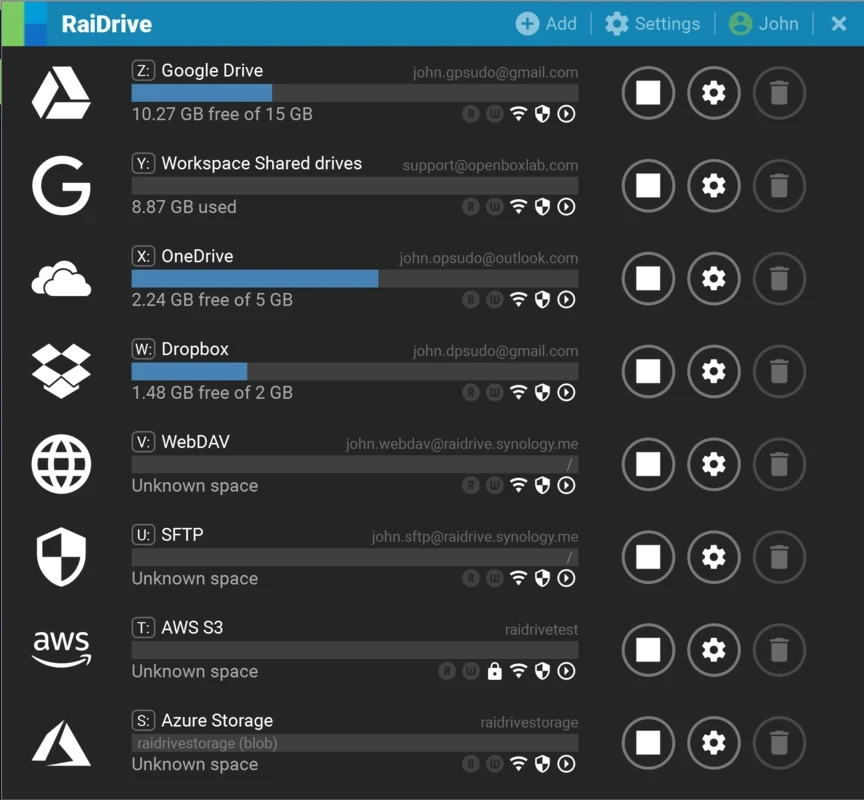


RaiDrive is a comprehensive tool for seamless file management, allowing access to Google Drive through your Windows PCs. It works similarly to other cloud services, enabling users to mirror entire files available in the cloud within an exclusive file. The file will be updated automatically with every upload of a new file.
The innovative tool, with support for bidirectional sync, ensures that changes on one side will be applied to the other side automatically. It also offers offline services to ensure accessibility, even without an internet connection, using the intuitive interface.
RaiDrive, developed by OpenBoxLab, falls under the File Transfer Utilities category and is an open-source utility, specifically designed for Windows. It offers seamless connection between the local file system and various remote file storage services.
The lightweight utility, while working as a plugin application, gives quick access to multiple cloud storage services, including Google Drive, Dropbox, Google Photos, and OneDrive, and is also integrated with FTP and SMTP locations, enabling users to streamline awesome file management across multiple devices as well.
The sleek and user-friendly user interface offers a seamless blend with the entire Windows ecosystem. When you connect any cloud storage to the software, it very quickly starts mapping the cloud storage as a network drive. In this way, it creates a virtual representation of the cloud storage on the user’s computer, making the cloud storage look like a natural extension of the local file system. It offers multiple familiar tools and features offered by Windows Explorer for accessing and managing the files and folders.
The app is capable of connecting as well as managing multiple cloud storage accounts, as it supports a wide variety of popular cloud services. It offers a unified interface for consolidating cloud storage without switching to other applications or browser windows. The popular supported cloud storage services are;
The availability of multiple advanced features offers an enhanced workflow and convenience, as it enables users to apply all basic features, including copying, moving, and deleting files right from their cloud storage drives. It offers entire automatic process, without requiring any manual steps, such as downloading or uploading files, and seamless synchronization ensures that changes made locally will automatically reflect across all connected devices and storage drives as well.
The app, with intuitive design and secure architecture, proves to be the best and simplest-to-use option, avoiding all types of complications for handling your remote data, regardless of the data type, whether for casual use or managing large volumes of data. You can efficiently perform multiple operations with foolproof security. In addition, the support for encryption and compression allows users to securely access their files and optimize storage space, compressing large files with one click. The extra layer of security helps to manage more sensitive files easily.
The availability of an intelligent caching mechanism offers an optimized workflow, allowing users to transfer data with low latency. This advanced capability makes frequently used files and folders quickly accessible, ensuring the fastest and most responsive file operations. In addition, the lightweight and resource-efficient app offers minimal impact on system performance.
The app offers a standard license for giving the users free access to a limited number of drives and network storage services. However, it also offers 7-days free trial version to test the premium version, and in case of feeling satisfaction, the users are allowed to unlock full-fledged functionality, including unlimited drives, sharing between users, access to both types of storage services, multi-user service, mounting network drives into physical discs, bandwidth control, and so on.
The app offers seamless integration with all Windows operating systems, proving the best choice in both scenarios: professional and personal use. It offers regular updates and dedicated support, ensuring ongoing stability and security enhancements. It offers a seamless user experience to manage cloud files using an intuitive interface, instead of a web browser.
Pros
Cons

AnyDesk, a fast remote access to computers

Accelerated Downloading with Internet Download Manager (IDM)

SHAREit for PC is the best option for a P2P file-sharing process without using Wi-Fi.

ShareMe for PC, a freeware and streamlined file-sharing app

uTorrent, a powerful, lightweight, and fastest P2P file-sharing software

Xender for PC, an effective and convenient file transfer utility